
This post outlines the importance of applying Screaming Architecture and Collocation in both your back-end and front-end projects, and how this helps you and your teammates.
Share this post & I’ll send you some rewards for the referrals.
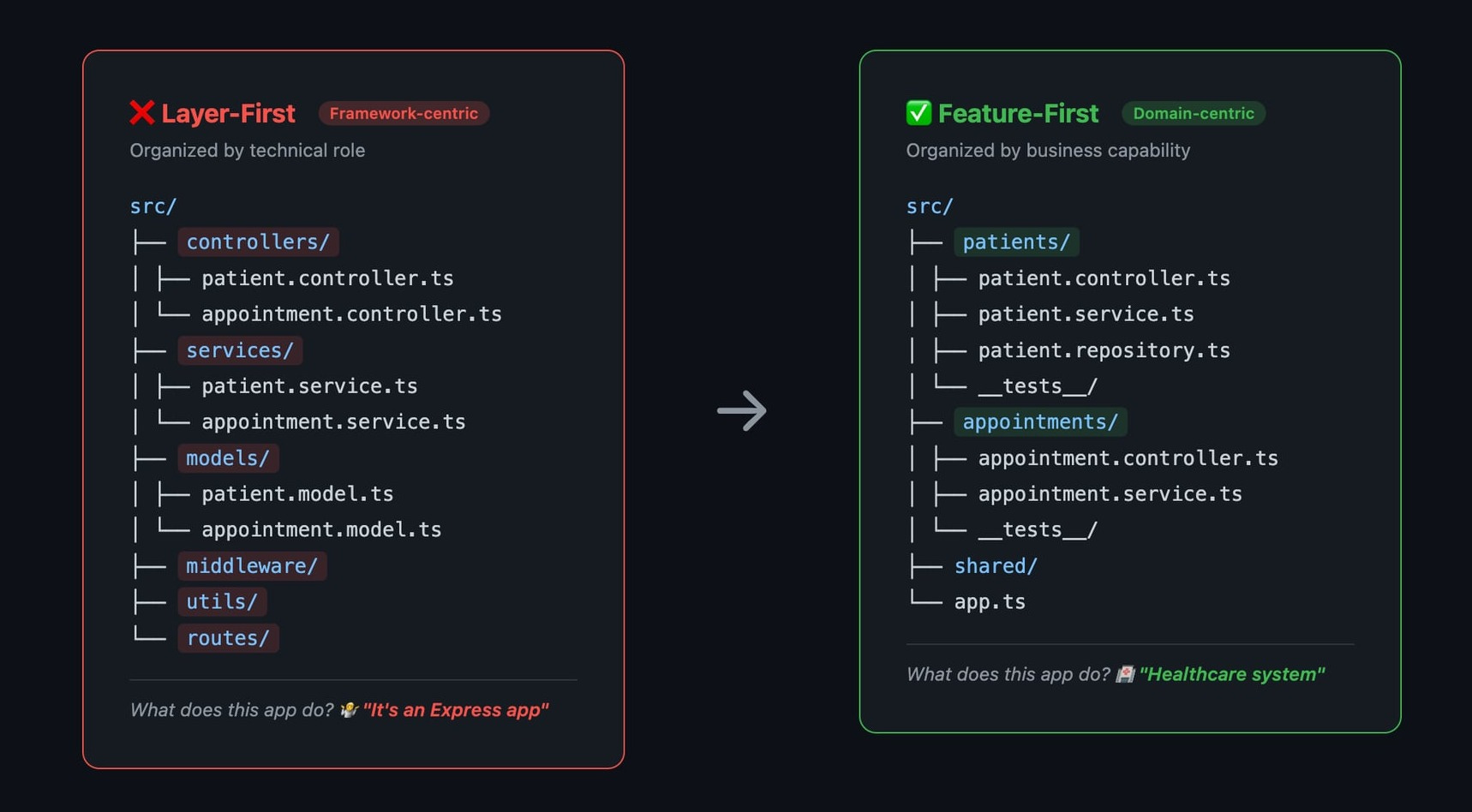
Open most Node.js projects, and you see this:
src/
├── controllers/
├── services/
├── models/
├── middleware/
├── utils/
└── routes/
What does this app do?
You see that it’s an Express app. But that’s all the structure tells you.
Is it an e-commerce platform? A healthcare system? A social network?
You’d have to open files and read code to find out.
That’s the problem.
What Is Screaming Architecture?
Uncle Bob coined the term:
Your project structure should scream what the application does, not what framework it uses.
For example, a healthcare app should look like this:
src/
├── patients/
├── appointments/
├── prescriptions/
├── billing/
└── shared/
You open the folder and immediately know: this is a healthcare system.
The domain is front and center.
Express, REST, GraphQL, Prisma, React, those are implementation details, tucked inside each feature.
And this is not just about aesthetics.
When folders map to business capabilities, you get:
Discoverability: New developers find code faster.
Ownership: Teams own features, not layers.
Change isolation: Modifying “appointments” doesn’t require touching 5 different layer folders.
Deletion: You can remove an entire feature by deleting one folder.
Low/High Coupling: Low coupling between features and High coupling for a single feature.
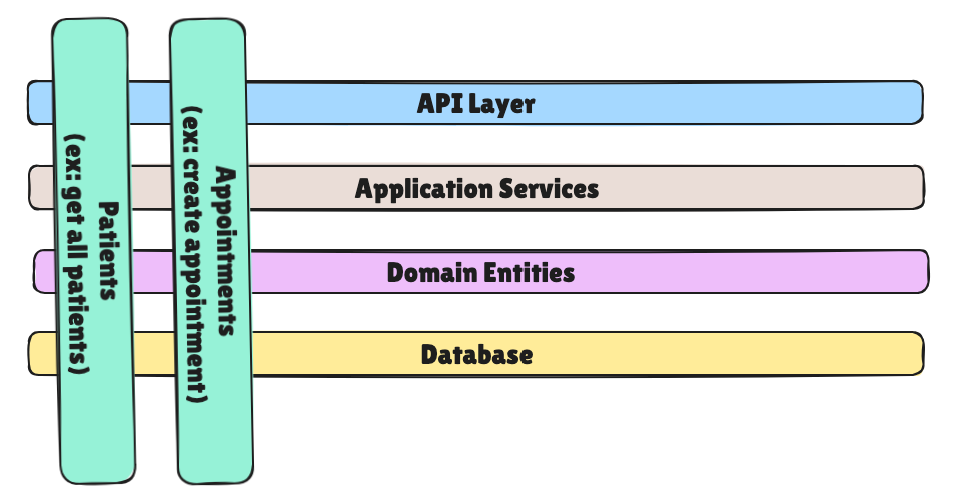
Or we could also look at it in another way to see more clearly how a single feature maps across different technical layers:
The Colocation Principle
In the React world, we must strive to:
Keep things as close as possible to where they're used.
Consider the following hierarchy:
If only one component uses it → put it in that component’s file
If only components in one folder use it → put it in that folder
If multiple folders use it → move it up to the nearest shared parent
If the whole app uses it → put it in
shared/orlib/
This is the same idea as screaming architecture, applied at a granular level.
Don't prematurely extract.
Don't create utils/ and helpers/ folders that become junk drawers.
Combining Both: Feature-First Structure
Here’s what a feature-first Node.js project looks like when you combine screaming architecture with colocation:
src/
├── patients/
│   ├── patient.controller.ts
│   ├── patient.service.ts
│   ├── patient.repository.ts
│   ├── patient.types.ts
│   ├── patient.validation.ts
│   ├── patient.routes.ts
│   └── __tests__/
│       ├── patient.service.test.ts
│       └── patient.controller.test.ts
├── appointments/
│   ├── appointment.controller.ts
│   ├── appointment.service.ts
│   ├── appointment.repository.ts
│   ├── appointment.types.ts
│   ├── appointment.validation.ts
│   ├── appointment.routes.ts
│   └── __tests__/
│       └── appointment.service.test.ts
├── shared/
│   ├── middleware/
│   │   ├── auth.middleware.ts
│   │   └── error-handler.ts
│   ├── database/
│   │   └── prisma.ts
│   └── types/
│       └── common.ts
├── app.ts
└── server.ts
Every feature is self-contained.
Tests live next to the code they test.
Shared infrastructure sits in shared/, but only things that are genuinely shared across features.
The Same Principle in React
src/
├── features/
│   ├── patients/
│   │   ├── PatientList.tsx
│   │   ├── PatientDetail.tsx
│   │   ├── usePatients.ts
│   │   ├── patient.types.ts
│   │   └── patient.api.ts
│   ├── appointments/
│   │   ├── AppointmentCalendar.tsx
│   │   ├── BookAppointment.tsx
│   │   ├── useAppointments.ts
│   │   └── appointment.api.ts
├── shared/
│   ├── components/
│   │   ├── Button.tsx
│   │   └── Modal.tsx
│   ├── hooks/
│   │   └── useAuth.ts
│   └── lib/
│       └── api-client.ts
├── App.tsx
└── main.tsx
Same idea.
Features own their components, hooks, types, and API calls.
shared/ contains only genuinely reusable pieces.
When Layers Still Make Sense
Layers aren’t always wrong. They work when:
Your app is small (< 10 files). Feature folders are overhead for a simple CRUD API.
You’re building a library. Internal structure matters less than the public API.
Your team is one person. You already know where everything is.
The pragmatic hybrid: features at the top level, layers within each feature.
Each feature has its own controller, service, repository, but they’re colocated, not scattered.
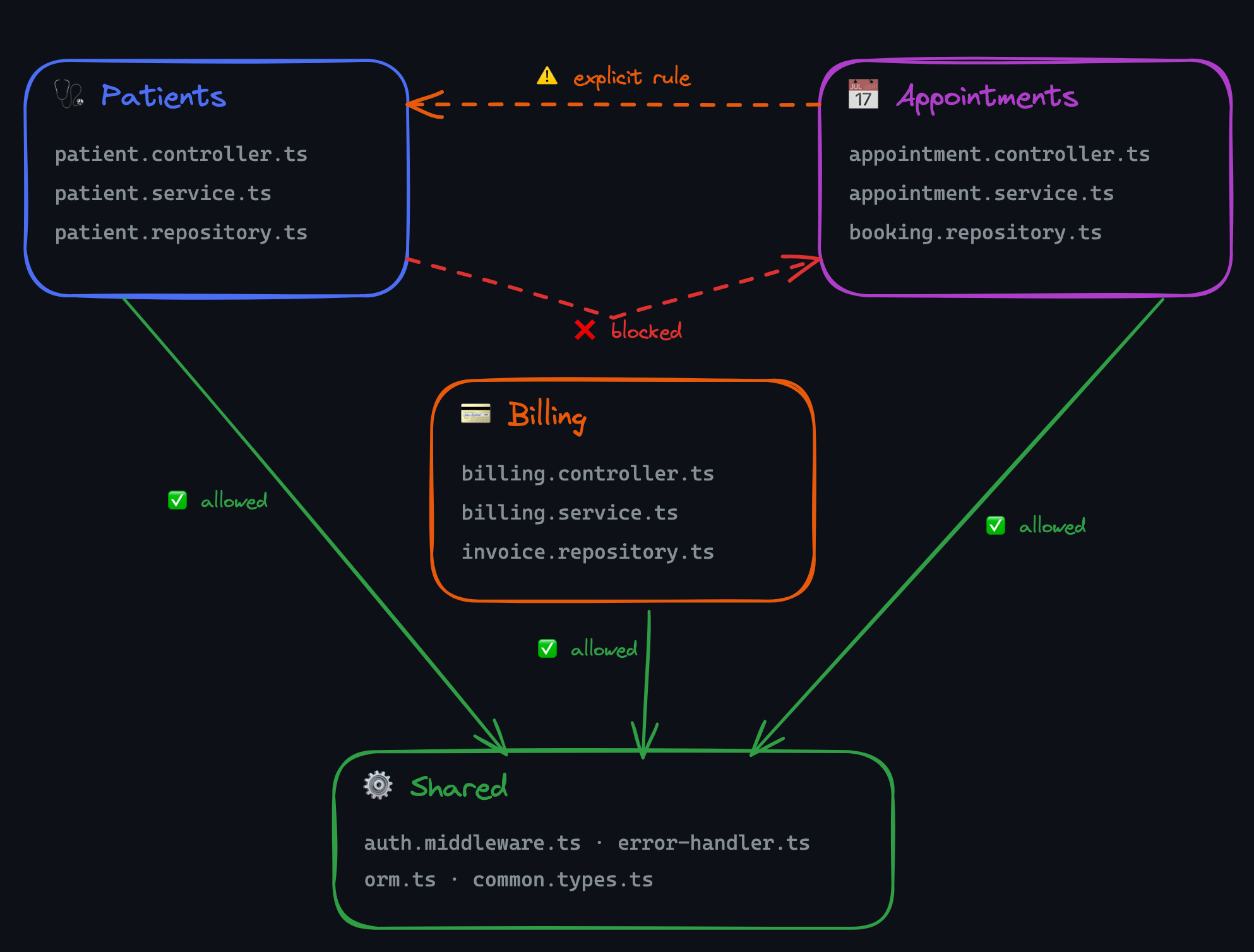
Enforcing Boundaries
Structure without enforcement is just a suggestion.
Here's how to make it stick:
ESLint (with eslint-plugin-boundaries)
// .eslintrc.js
module.exports = {
  plugins: ['boundaries'],
  settings: {
    'boundaries/elements': [
      { type: 'patients', pattern: 'src/patients/*' },
      { type: 'appointments', pattern: 'src/appointments/*' },
      { type: 'shared', pattern: 'src/shared/*' },
    ],
  },
  rules: {
    'boundaries/element-types': [2, {
      default: 'disallow',
      rules: [
        { from: 'patients', allow: ['shared'] },
        { from: 'appointments', allow: ['shared', 'patients'] },
      ],
    }],
  },
};
TypeScript Project References
// src/shared/tsconfig.json — every referenced project needs composite: true
{
  "compilerOptions": {
    "composite": true,
    "rootDir": ".",
    "outDir": "../../dist/shared"
  }
}
// src/patients/tsconfig.json
{
"compilerOptions": {
"composite": true,
"rootDir": ".",
"outDir": "../../dist/patients"
},
"references": [
{ "path": "../shared" }
]
}Each feature is a TypeScript project.
It can only reference what's listed in references.
The compiler enforces boundaries at build time.
📌 Key Takeaways
Your folder structure is documentation. It should tell a new developer what the app does in 5 seconds.
Organize by feature, not by layer. Controllers, services, and models for the same feature belong together.
Colocate aggressively. Tests, types, and utilities live next to the code that uses them. Move things to
shared/only when two or more features need them.Migrate incrementally. One feature at a time, one PR at a time. No big-bang restructures.
Enforce with tooling. ESLint boundaries, TypeScript project references, or Nx module boundaries. Structure without enforcement decays.
The best architecture is invisible. When a developer opens your project and immediately knows where to find what they need, without reading a README or asking a teammate, your structure is doing its job.

Follow me on LinkedIn | Twitter(X) | Threads
Thank you for supporting this newsletter.
Consider sharing this post with your friends and get rewards.
You are the best! 🙏

Press the Like button if you found this post helpful
I went to a talk at SoCal Linux Expo called Build a Better Loop: A Guide to Platform Engineering (sorry, I am away from home and can't get you a link to the talk yet, but eventually the livestream will be edited and this talk will be available as a single youtube video)
One of the things the speaker, Arthur Freyman, suggested you do today is audit your legibility so AI agents can tell who owns and depends a service based on its name. In this article, you are suggesting something very similar, but the upshot is you are doing this as well! Of course, it makes it easy for both AI agents AND humans to figure out this information with a glance.
Maybe this can give you some other view: I find this structure rather basics for a large app https://www.linkedin.com/pulse/layer-pattern-vs-module-folder-structure-context-ai-machiraju-rdmec